How QUIC protocol works
Author: mk
QUIC is the new protocol described in the document RFC 9000, a reliable Transport layer protocol that aims to improve the old TCP (Transmission Control Protocol) that is created in the 70s of the 20th century, but still runs the internet today.
Before explaining QUIC, we have to take a few steps back and go a bit deeper and see how the internet works under the hood, so you can understand more easily the benefits of QUIC, and why it is used in the NIOX project.
If you already know very well how protocols in the Transport and Application layer work, feel free to skip the first part of this article.
The foundation of the World Wide Web and HTTP
The old and legacy versions of HTTP: HTTP/0.9, HTTP/1, HTTP/1.1, and HTTP/2 are all based on TCP, to transfer reliable data, and preserve the integrity and order of data.
The internet is chaotic by default, to send a message, the data must be split into multiple packets first that will travel through different routes (Packet Switching), and then those packets will be reassembled together.
This is done because a single large block of data would clog the network, and would be impractical.
But multiple packets traveling in different paths have the following trade-offs:
- The order of the arriving packets is not guaranteed
- Each individual packet may encounter issues and may be lost
This is where the TCP (protocol) comes in place, as the solution for both of the issues to reassemble the packets in order, and check their integrity, if a packet is missing (lost) or corrupted, the destination device will ask for the retransmission.
HTTP is primarily based on TCP to deliver the contents of a website, fonts, images, etc. correctly.
TCP Segments
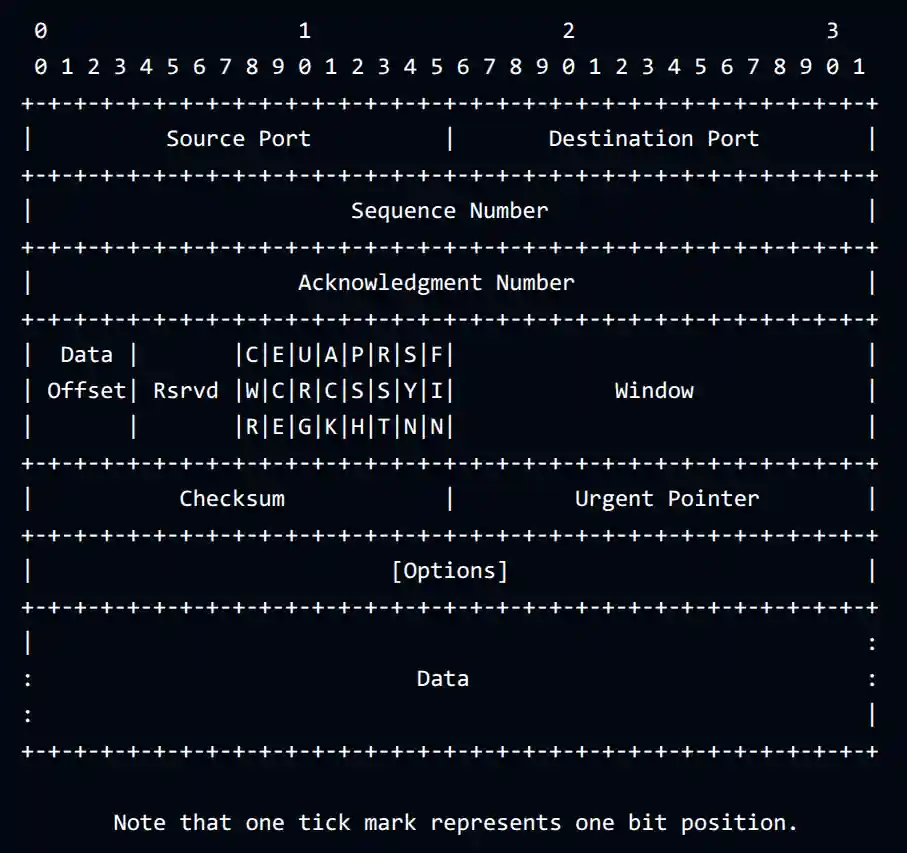
Each TCP segment contains a fragment of the transferred data, it has its own header that follows a specific format described in the RFC 9293 document.
The following image represents a TCP segment.
Worth specifying that a bit is the smallest and atomical data representation in computer science, it is a single digit that can have two states (zero or one), they are commonly referred with a lowercase b suffix to represent the amount of bits (for example: 192kbps, meaning 192 kilobits per second). Multiple bits can represent a larger data, like a number or a letter.
A group of eight bits is defined as a Byte, commonly referred with an uppercase B suffix (example: 10MB, 10 megabytes).
Before sending segments, the host and server have to establish a connection, the TCP achieves it with a three-way handshake request that requires 3 roundtrips.
Security issues, SSL/TLS and HTTPS
The TCP itself does not cover the encryption process, which is a critical security component that prevents unauthorized actors from reading your data, including passwords, credit card information, etc.
In a few words, the segments are sent as clear text over the internet by default.
To mitigate this problem, an additional protocol is designed to encrypt text, and make data unreadable to unauthorized actors, known as SSL (Secure Sockets Layer), the latest version SSL 3.0 is described in the RFC 6101 document, but this protocol has critical security vulnerabilities, like the POODLE attack vulnerability, that allowed bad actors to decrypt data through MITM attacks (man-in-the-middle), described in the CVE-2014-3566, disclosed by Google security researchers in 2014 and nowadays SSL is deprecated and replaced with a newer protocol, TLS (Transport Layer Security), which some people mistakenly still refer it as "SSL".
The connection is encrypted using asymmetric encryption keys with a specific algorithm, like the ECDHE algorithm.
Asymmetric encryption has two separate keys (think a key as a password with "random" characters with a specific length). The pair is commonly referred as public key which is publicly accessible, and private key which is kept secret, one key is used to encrypt data and the other is used to decrypt it, either key can be used to encrypt, with the other required to decrypt. It is impossible to decrypt data using the same key used for encryption, that's why it is called asymmetric encryption.
The way it works is interesting and complex, and won't be covered in this article; but in a few words, it's math magic :3
The TLS protocol has to make a few more roundtrips to establish a TLS connection before we can start sending encrypted data. The host will ask for a certificate from a trusted CA (Certificate Authority).
Certificates are related to the PKI (Public Key Infrastructure).
This is a large topic and won't be explained in this article, but if you're interested, it's still related to the NIOX project, so an article will be written about that specifically, and once it's published the link will appear here.
TLS has 4 major versions, but the ones that are used today are TLS 1.2 and TLS 1.3, the older ones are deprecated.
TLS 1.2 takes 2 roundtrips to establish a connection, meanwhile TLS 1.3 optimizes the process and takes only one roundtrip.
Once the connection is established, we can transmit data securely with TCP. In the HTTP context, this is the process that enables HTTPS (HTTP Secure). The same concept applies to a few other Application layer protocols as well, like the FTP (File Transfer Protocol) transmits unencrypted data by default, unless TLS is configured on top of it, then it becomes FTPS.
TCP vs UDP
So far we have seen that TCP allows to send and receive data in order, with integrity check, but on the other hand, we have the UDP (User Datagram Protocol) described in RFC 768, which is much more fast and lightweight compared to TCP, it doesn't require any initial handshake to establish a connection.
The UDP (protocol) sends fragments of data in datagrams, but it doesn't guarantee the order of arrival, and also missing or corrupted datagrams are discarded by default; unlike in TCP, where the device has to ask for retransmission.
To make it clear, TCP is slow but reliable, often used to transfer every single Byte of information correctly, like uploading a file to the server. And UDP, is fast but doesn't care about the order and integrity of data, and it's often used in VoIP calls, online streaming, WebRTC, etc.
QUIC and HTTP/3
Whenever TCP is used, every time we need a new connection, we have to go through the three-way handshake for the TCP and then establish a TLS connection in addition with another handshake, and it is very inefficient.
This is where QUIC comes in place, as described at the beginning, the protocol was designed to improve TCP.
QUIC is built on top of UDP, but implements its own system to deliver reliable data more efficiently.